Cernunnos/near enough NE-1 · r0.2 · prototype

A wall clock · four circuit boards · Ø250 mm

A clock that's
near enough.

Circuit boards, even the hands, and a motor for each hand. Most of the time it keeps time. Now and then it stops and hurries to catch up, runs ahead and waits for you, or goes back and thinks better of it. Turned right up, it throws tantrums and runs round the whole day. It's always right on the hour, and the twelve glows while it's right.

It says --:--. It's --:--.

01 · How near

Right on the hour. Roughly, in between.

A dial on the back, set with the clock off the wall, says how wild it gets: 0 is an honest clock, 6 is six minutes either way, and 7 to 10 are mad: it stops for up to three quarters of an hour, throws tantrums, and now and then runs round the whole day. It decides each minute what to show, from the time and a number of its own, so no two clocks misbehave alike.

0 · dead on3 · near enough10 · mad as a cut snake

It says --:--. It's --:--.

This hour, minute by minute: how far the clock on this page is from the time, fast above the line and slow below it. The orange marks where the twelve is lit. It's this page's own clock, by the firmware's rules, ported line for line.

  • On the hour it's right. Every hour, at any setting.
  • Never further out than the dial says, at rest, to the minute.
  • The hands always agree. They have a motor each, but they tell the same story.
  • The twelve tells you. It glows orange while the hands are right, and goes out while they aren't.
  • You'll hear it. A small speaker clicks like winding when the hands race, so you look up. Ask it to and it ticks every second, unevenly, as Vetinari's clock does, going quiet when the hands stop. Silent in a dark room.

02 · The twelve

Lit while it's right.

The face is a circuit board, and at twelve its copper and its black mask stop: a window of bare FR4. Two orange LEDs behind it light it up whenever the hands show the true time. When it's being near enough, the twelve goes dark. You learn to trust it when it's lit.

FR4
The board's own glass-fibre core, which glows warm when lit from behind.
Two LEDs
Orange, one at each end of the bar, in a white printed baffle so the bar lights evenly.
Dims
A light sensor in the same window reads the room between flashes, so it never glares at night.

03 · Inside

A face, a spine, a plate.

  1. Back plateA third board, flat on the wall on felt pads, hidden behind the face: a keyhole for one screw, and a hole for the dial.
  2. MotorBKA30D-R5: two steppers in one case, one shaft inside the other, up through both boards.
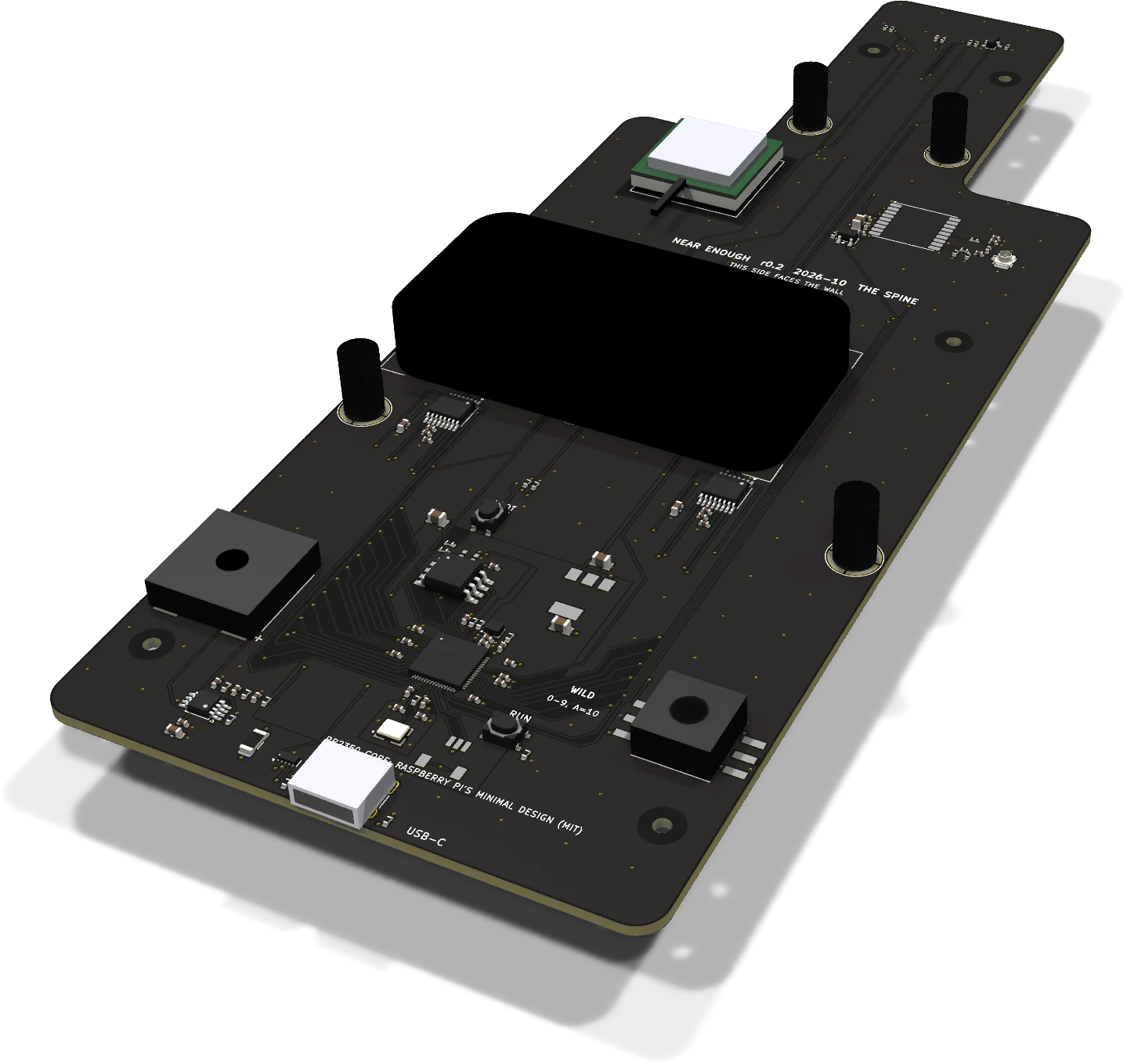
  3. The spineA narrow board down the middle with everything on it: the RP2350, the drivers, the GPS, the speaker, the dial, and at its foot the USB-C, facing down, so the cable hangs straight down behind the face. Tall standoffs hold it off the plate. The LEDs, the light sensor and the Hall sensors on its inside.
  4. BafflePrinted in white, 1.5 mm, filling the gap round the LEDs so the twelve lights evenly.
  5. Face boardNo parts, no text, no holes. Eleven gold bars and a gold edge. Standoffs soldered to its back hold it 1.5 mm in front of the spine. Nothing pierces it but the shafts.
  6. HandsCircuit board too: ENIG gold all over, edges plated, the bars' own gold. Balanced by tungsten weights, with a 3 mm magnet in each so the clock can find them.

04 · It sets itself

Hang it up. That's all.

A GPS receiver on the back board takes the time from the satellites, and the time zone from where it hangs, daylight saving and all. There's nothing to set, no clock chip and no battery for one.

A fix now and then
Between fixes it keeps time on its own crystal, a couple of seconds a day at worst. Indoors, a fix now and then is plenty.
Power cuts
It finds its hands again by their magnets, then they wait at twelve until it knows the time.
Daylight saving
By the rules of the zone it's in. In April it runs the hands back the hour, the short way.
It only listens
GPS sends nothing. It knows where it is and tells no one.
No sky?
On an inside wall far from a window, set it once over USB-C, below.

05 · No sky

Or plug it in once.

If it can't see the sky, it takes the time from your computer instead, over the same USB-C it runs on. The page talks to it over Web Serial, in the firmware's own plain-text commands, so a terminal works too.

  1. Plug its cable into your computer instead of the charger.
  2. Open this page in Chrome or Edge and press Connect.
  3. Choose your time zone and press Set. Plug it back into its charger.
Not connected

        
Near Enough's back board, rendered at an angle

06 · The boards

One does the work.

The face is artwork and a few pads. The spine carries everything: Raspberry Pi's own RP2350 core, as on the slab, and round it the motor's drivers, the GPS and the sensors, on both sides.

RP2350A
The Pico 2's chip. It decides each minute what the hands show, and moves them.
GPS
A multi-system receiver (GPS, BeiDou, GLONASS) and its antenna: the time, and where it is.
HR8833 × 2
Two H-bridges each, one per coil. The firmware microsteps them by PWM.
TMAG5273 × 2
3D Hall sensors behind the twelve, 4 mm from the hands' magnets. They find the hands, and check them twice a day.
LEDs, a light sensor
Behind the window at twelve.
The dial
A 16-position switch on the back, 0 to 9 and A for 10, turned with a fingernail with the clock off the wall.
A speaker
A small one on the wall side, with its own amplifier: the ticking.

07 · Make it yours

Both hands are yours to point.

The brain is an RP2350, the chip on Raspberry Pi's Pico 2, with Raspberry Pi's own circuit round it. Its firmware is plain C on the Pico SDK, and its source comes with it. Count down to knock-off, run a day backwards, or keep somewhere else's time.

New firmware, no tools

  1. Plug it into a computer and send it bootsel, from the console above or any terminal.
  2. The computer sees a drive called RP2350.
  3. Drag a .uf2 onto it. It restarts, running it.

The drive is the RP2350's own boot ROM, so nothing you write can brick it. If yours won't start, hold BOOT on the back board while you plug it in.

Write it in anything

Anything built for a Pico 2 runs on it: C, Arduino, MicroPython. The clock's own firmware keeps its rules in portable C with tests that run on a laptop, and this page's clock is those rules, ported line for line.

The pins

GPIO 0–7
The two motors, through their drivers
GPIO 8, 9
The drivers' sleep and fault
GPIO 12, 13
I2C: the Hall sensors
GPIO 17, 20, 21
GPS: its pulse, TX, RX
GPIO 10, 11
The speaker: its sound (PWM); its amplifier on
GPIO 14
The twelve's LEDs
GPIO 22 to 25
The dial's four bits
GPIO 27
The light
src/core/mood.c: each mode's temper. Change a weight and your clock misbehaves more, or less.
…

08 · Specifications

The numbers.

SizeØ250 mm; 17.8 mm from the wall to the face
WeightAbout 330 g
FaceA circuit board: black mask, ENIG gold bars and edge, no text, a window of bare FR4 at twelve; no parts, nothing through it but the shafts
Hands0.6 mm circuit board, ENIG all over and edge-plated, the same gold as the bars; hour 70 mm, minute 110 mm; balanced by tungsten weights; a Ø3 mm magnet in each
MotorBKA30D-R5 dual-shaft stepper, 180:1, 1/12° microsteps, one motor per hand
How nearA dial on the back, 0 to 10: up to 6 minutes out, then mad at 7 to 10 (stops of up to 45 minutes, tantrums, a run round the day); right on the hour at every setting
SoundA small speaker: it clicks like winding when the hands race. Ask it to and it ticks every second, unevenly above 0. Volume or off over USB-C; silent in the dark
The twelveTwo orange LEDs behind bare FR4: lit while the hands are right; dims with the room
TimeGPS (with BeiDou and GLONASS): the time and the zone, daylight saving by the zone's rules; or set once over USB-C
PowerUSB-C, 5 V, any charger. The socket is at the bottom of the spine, facing down, so the cable hangs straight down behind the face
BrainRaspberry Pi RP2350A
FirmwareYours: C on the Pico SDK, source included; new firmware by drag and drop
BoardsFour: the face (Ø250), the spine behind it, the back plate (Ø170) and the hands, all ENIG and black mask
MountingThe back plate, flat on the wall on felt pads, with a keyhole for one screw; nothing printed shows
StatusPrototype: the boards, parts and firmware are drawn and checked, not yet made
CatchIt's wrong on purpose. Set the dial to 0 to catch a train.
Not checkedThe motor's shafts must reach 10 mm past its case; and GPS on an inside wall. Both want a clock on the bench, and on a wall.